

Introduction
Finding a tab you used recently shouldn’t require remembering which window it was in.
Most browsers organize tabs by where they live: which window, which group, which position. But when you’re trying to return to something you worked on earlier, you usually remember when you used it, not where it was.
A recent activity view solves this by organizing tabs based on the last time they were accessed, letting you navigate your browsing history by time instead of layout.
By organizing tabs by time, recent activity views also make it easier to group, close, or clean up relevant tabs in bulk.
The Problem with Layout-Based Tab Management
When you have many tabs and windows open, layout stops being helpful.
You might remember:
- “I was on this page earlier today”
- “I checked that tab a few hours ago”
- “I worked on this yesterday”
But the browser asks you to remember:
- Which window it was in
- How many tabs deep it was
- Whether it’s even still around
As tab sessions grow, this gap between memory and layout makes it harder to resume work quickly.
What Is a Recent Activity View?
A recent activity view organizes tabs by when they were last accessed, rather than by window or group.
Instead of seeing tabs arranged by browser structure, you see them ordered chronologically, showing what you interacted with most recently first.
This makes it easier to:
- Return to tabs you were just using
- Pick up work from earlier in the day
- Revisit something you remember by time, not location
Navigate Tabs by Time, Not Windows
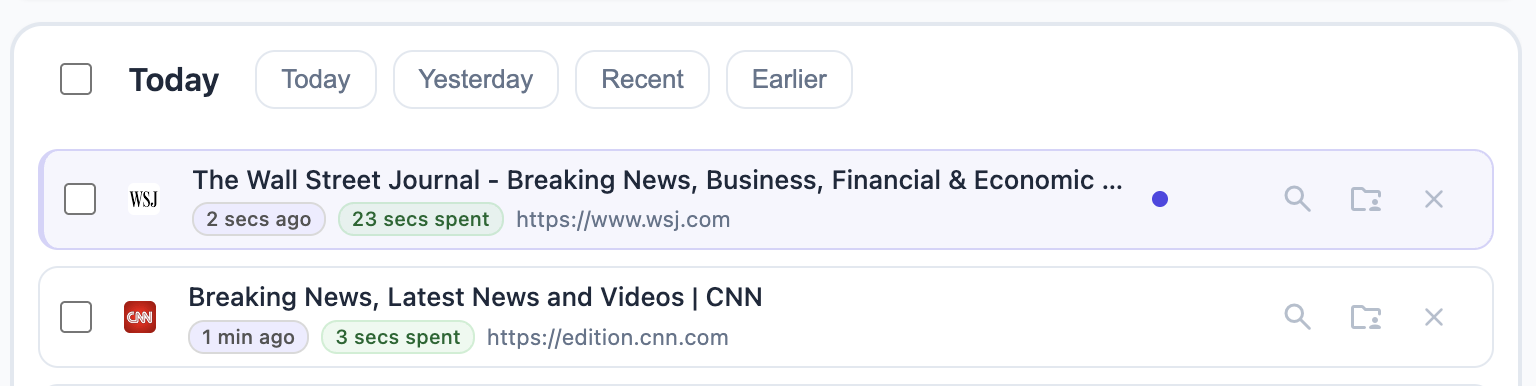
With a recent activity view, time becomes the primary navigation tool, and you can jump between different time frames. For example:
- Tabs used in the last few minutes
- Tabs accessed earlier today
- Tabs you interacted with on previous days
This lets you quickly scan what you were doing during a specific period and jump back into context without hunting through windows or groups.
Why Time-Based Views Feel More Natural
Human memory is often temporal.
You’re more likely to remember:
- when you saw something
- what you were doing at the time
- what came before or after it
A recent activity view aligns with this mental model, making it easier to reconnect with past work and reducing the friction of context switching.
When a Recent Activity View Is Most Useful
A time-based tab view is especially helpful when:
- You switch tasks frequently during the day
- You want to resume work from earlier without reopening everything
- You remember using a tab but not where it was
- Your browser has many windows or tab groups
Because tabs are grouped by when they were last accessed, you can also organize and clean up tabs in bulk. For example, you might close all tabs you haven’t touched in a few days, or group all tabs from yesterday into a single tab group.
Instead of scanning layouts and selecting tabs one by one, you move through time - and act on entire time frames at once.
Using Recent Activity in Practice
A typical workflow looks like this:
- Open the recent activity view
- Jump to a relevant time frame
- Scan tabs by last accessed time
- Select the tab you want to return to
This turns your browser into a timeline of activity, rather than a collection of scattered windows.
Summary
A recent activity view helps you find tabs based on when you last used them, not where they were placed.
By organizing tabs chronologically and allowing navigation between time frames, it becomes easier to resume work, recover lost context, and move through your browsing history with less friction.
TabsPrompt includes a recent activity view as part of its tab management experience, giving you a time-based way to navigate and return to your tabs.
Ready to transform your browsing experience? Try TabsPrompt and see how intelligent tab management can improve focus and reduce clutter.
Try TabsPrompt