You're in the middle of something. Maybe writing code, maybe halfway through a doc, maybe researching a problem you almost understand. Your fingers type reddit.com. Not a conscious decision - muscle memory. Fifteen minutes later you're reading about someone's sourdough starter and you've lost the thread of whatever you were doing.
You know the pattern. Everyone does. And if you've tried to fix it with a site blocker or website blocker before, you know the other pattern: install it, get annoyed within three days, disable it or uninstall it entirely.
Hard blockers fail because they treat you like a child. Motivational quote blockers fail because reading "You should be working!" doesn't actually remind you what you were working on. The problem was never access to Reddit - the problem is forgetting what you were doing before you opened it.
What happens when you open a blocked site
You type reddit.com during work hours. Before the page loads, TabsPrompt intercepts the navigation and replaces it with a page titled "You were working on..."
Below the heading, you see your actual tab groups - the ones you have open right now. Each group shows its name, color, and up to three of its tabs. If you had a "Q1 planning" group with three Google Docs and a spreadsheet, that's what you see. If you had a "Bug investigation" group with a Sentry page and two Stack Overflow tabs, that's there too.
A 7-second countdown runs at the bottom. When it finishes, two buttons appear: "Continue to reddit.com" and "Back to work."
That's it. No lecture. No motivational poster. Just your own work context staring back at you, and a few seconds to remember why you opened the browser in the first place.
Why showing your work matters more than blocking it
Hard blockers create an adversarial relationship with your own browser. You installed the blocker, so now you're fighting it. The first time it blocks something you actually need - a YouTube tutorial, a Reddit thread with a solution to your bug - you start looking for the override. Once you've overridden it once, the seal is broken.
The friction that actually works is re-engagement, not denial. Seeing your tab groups isn't a punishment. It's a reminder. You glance at "API migration" with four tabs and think "right, I was in the middle of that." The 7-second pause gives your prefrontal cortex time to catch up with whatever autopilot navigation your fingers started.
Once you see your tab groups, you often remember what you were doing - and "Back to work" stops feeling like discipline and starts feeling like picking up where you left off.
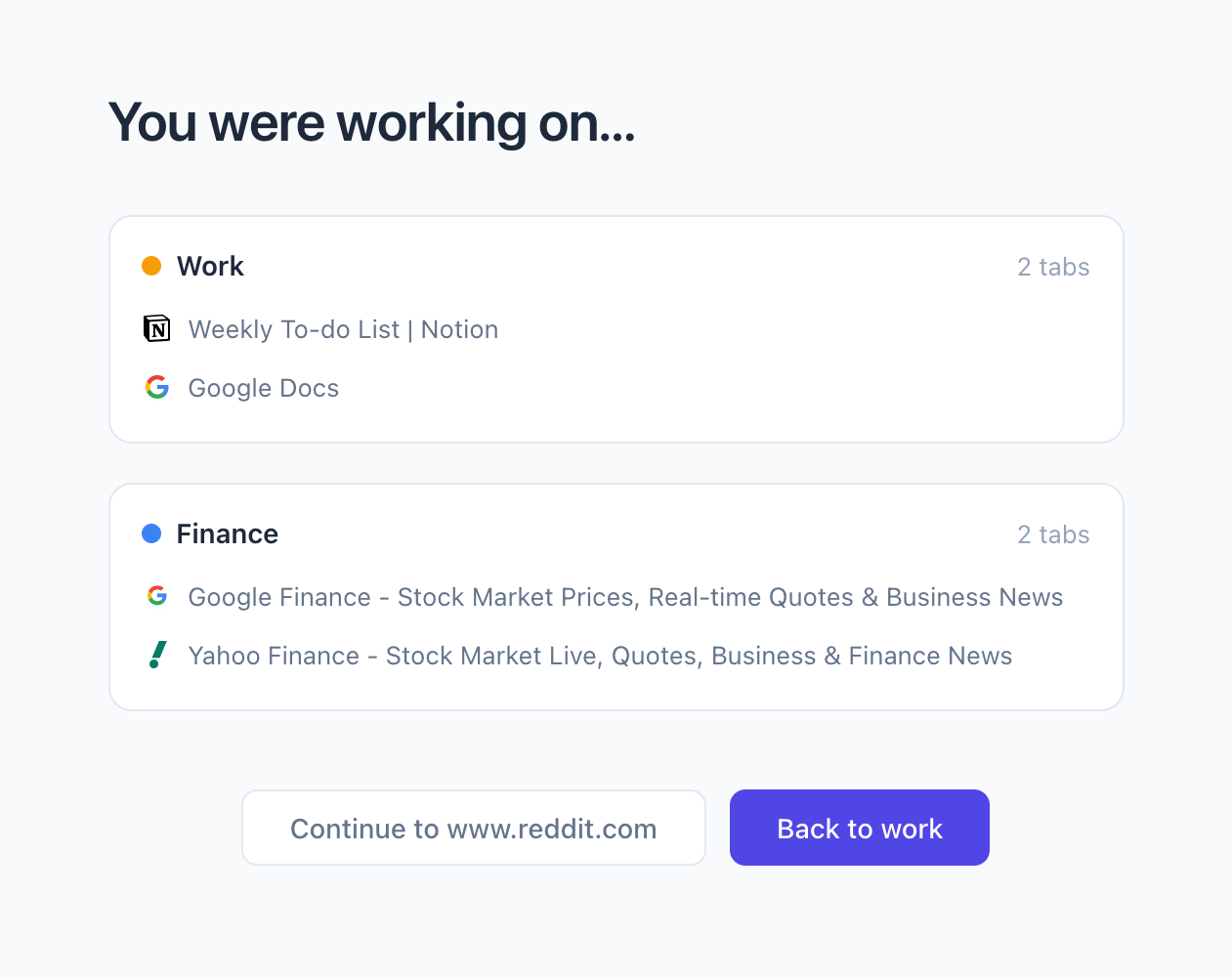 Site Blocker Page showing your work
Set your schedule and distraction list
The site blocker ships with a default list: Reddit, Twitter/X, Facebook, Instagram, TikTok, and YouTube. These are on by default - toggle any of them off if you actually use one for work.
The schedule defaults to Monday through Friday, 9 AM to 5 PM. Change the days, change the hours. Outside your schedule, every site loads normally.
Pro users can add custom domains and adjust the friction delay. Everyone else gets the defaults, which cover the usual suspects.
One bypass per tab, no guilt
When you click "Continue to reddit.com," that tab remembers your choice. Browse Reddit in that tab as long as you want. But open a new tab and type reddit.com again? New decision.
There's no streak counter. No "you've been distracted 4 times today" dashboard. No shame metrics. The site blocker is a circuit breaker, not a parental control. It interrupts the autopilot moment between "I was working" and "I'm on Reddit now" - and once you've made a conscious choice, it gets out of the way.
Bypasses reset when you close the tab.
Try it
Install TabsPrompt, open Settings, and enable the site blocker. Then open Reddit.