

What shipped
Update May 30, 2026: Chrome now has dedicated WebMCP documentation that points to a Chrome 149 origin trial. Read the follow-up: WebMCP is moving into Chrome origin trials.
Chrome 146 Canary has a new browser API called navigator.modelContext. It lets any website register JavaScript functions - with descriptions and input schemas - that AI agents can call directly.
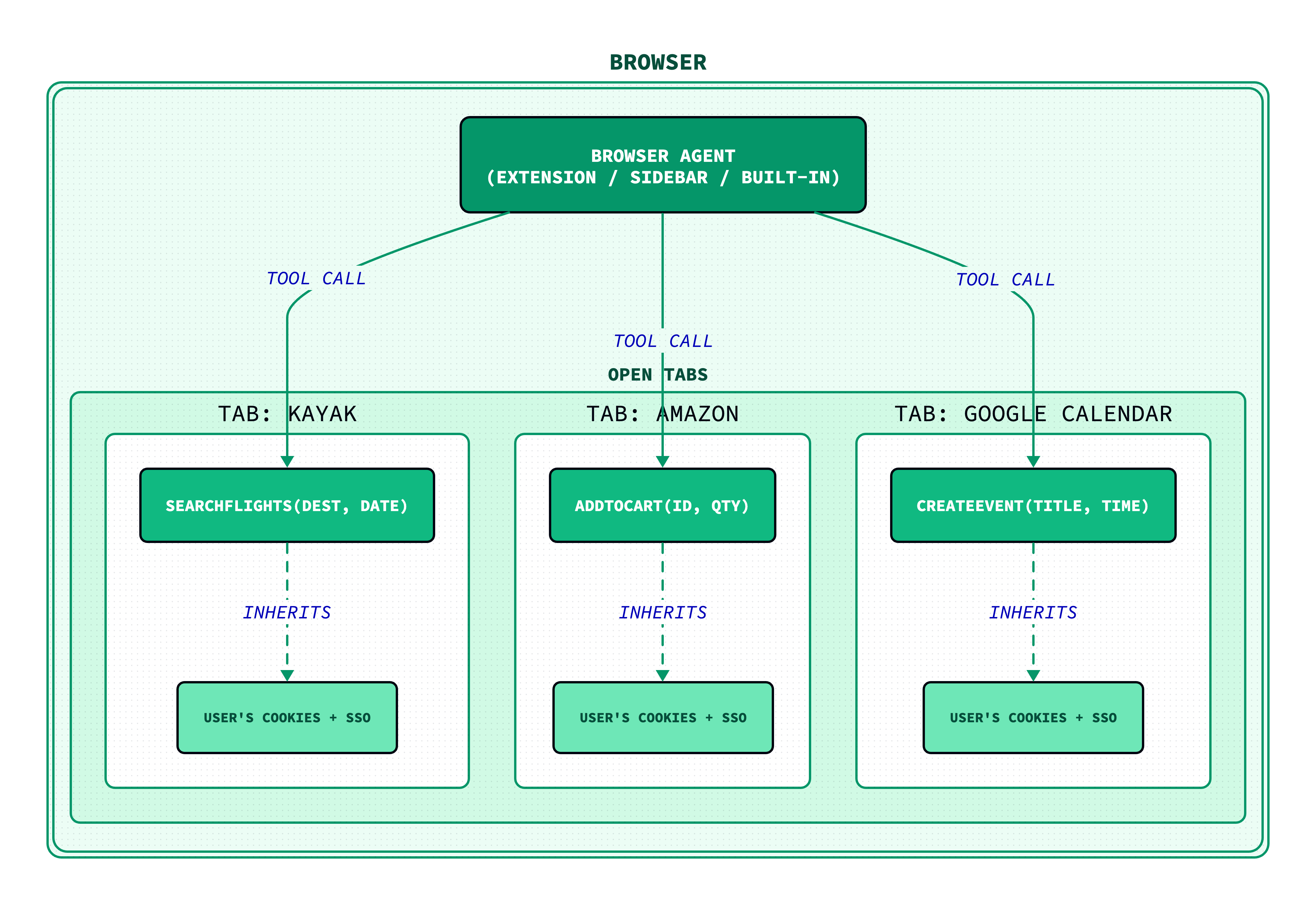
A flight booking site registers searchFlights(destination, date). A shopping site registers addToCart(productId, quantity). An AI agent reads the function signatures, calls them, gets structured JSON back. No DOM scraping, no simulated clicks, no guessing which button does what.
The W3C published WebMCP as a Draft Community Group Report on February 10, 2026. Google and Microsoft co-authored it.
How it works
A website registers tools with a few lines of JavaScript:
navigator.modelContext.registerTool({
  name: "search_products",
  description: "Search the product catalog by keyword",
  inputSchema: {
    type: "object",
    properties: { query: { type: "string" } },
    required: ["query"]
  },
  execute: async ({ query }) => {
    const results = await catalog.search(query);
    return { content: [{ type: "text", text: JSON.stringify(results) }] };
  }
});
There's also a declarative approach. Add toolname and tooldescription attributes to an existing HTML <form>, and the browser auto-generates the tool schema from the form fields. No JavaScript required for simple cases.
The page itself is the server. No backend infrastructure, no separate API surface. The tool runs in the page's JavaScript context, which means it inherits the user's auth session - cookies, tokens, everything. The browser mediates all calls.
How to try it out
WebMCP is live in Chrome Canary right now. Four steps to get it running:
- Download Chrome Canary (version 146+).
- Enable the flag at
chrome://flags/#enable-webmcp-testingand relaunch. - Install the Model Context Tool Inspector (source) — it shows every tool on the current page and lets you execute them.
- Open Google's flight search demo and call the registered tools from the inspector. More demos in the webmcp-tools repo.
To test on your own page, drop this into any page served over HTTPS (or localhost):
navigator.modelContext.registerTool({
  name: "greet",
  description: "Say hello to a user by name",
  inputSchema: {
    type: "object",
    properties: { name: { type: "string" } },
    required: ["name"]
  },
  handler: async ({ name }) => ({ message: `Hello, ${name}!` })
});
Open the Model Context Tool Inspector, and your tool will show up. Call it, pass a name, get JSON back. That's the full loop.
A few caveats: this is a DevTrial, not a stable API. The spec will change. HTTPS is required outside localhost. And Google's own developer blog says to prototype with it, not ship to production.
Where it came from
Alex Nahas built the precursor at Amazon in early 2025. Amazon had deployed a massive internal MCP server with thousands of tools, and it was failing in two ways: context windows were overflowing, and every service had its own authentication system with no shared OAuth.
Nahas put the MCP SDK in client-side JavaScript. Use the browser's existing SSO session instead of fighting with per-service auth. He called it MCP-B - the "B" for browser - and built a Chrome extension that used postMessage as the transport layer.
Google's Chrome team had been working on something similar internally ("script tools"). Microsoft's Edge team had too. When they found Nahas's implementation, they partnered through the W3C to formalize it. The Arcade.dev interview with Nahas covers the full origin story.
What changes for websites
Right now, AI agents interact with websites by scraping the DOM and simulating clicks. It works, but it's brittle. A redesign breaks every automation that depended on a specific button class or element ID.
WebMCP gives websites a way to offer structured, versioned entry points instead. Register addToCart(productId, quantity) and an agent can call it directly, get JSON back, and move on. No screenshot parsing, no retries after a layout change.
The incentive is straightforward: agents will prefer sites that expose tools over sites that make them guess. A flight search that returns structured JSON through searchFlights() beats one where the agent has to fill form fields, wait for a page render, and parse the results out of HTML.
This creates a new optimization surface. SEO was about making your site legible to search crawlers. WebMCP is about making your site callable by AI agents. The sites that register tools early will get disproportionate agent traffic, the same way sites that adopted structured data early got disproportionate rich snippet placement.
What's still missing
The spec is a draft. Some of the questions don't have answers yet. Some example include:
Duplicate tools. Two tabs register search_flights. Which one does your agent call? The spec prevents duplicates within a single page, but says nothing about conflicts across tabs. Whoever aggregates tools - the extension, the sidebar, the built-in agent - has to figure out disambiguation on their own.
Discovery. There's no way for an agent to find tools before visiting a page. No directory, no .well-known/webmcp endpoint, no manifest file. Backend MCP servers are configured once and always available. WebMCP tools exist only while the tab is open.
Prompt injection. A malicious page could register a tool called get_bank_balance that returns poisoned data. The spec has an open issue for this but no mitigation yet.
What happens next
Chrome 146 stable ships around March 2026. Microsoft co-authored the spec, so Edge support is likely. Google's own developer blog says to prototype with it, not ship to production.
But the direction is clear. Browsers used to serve two audiences: humans and screen readers. WebMCP adds a third: AI agents.
Where TabsPrompt fits in
We built TabsPrompt to make the browser a calmer place to work. Search across all your tabs, save groups that persist across sessions, archive what you don't need right now.
Now that each tab is becoming a collection of tools for AI agents, we're doubling down. We're exploring how TabsPrompt can help you see what tools your open tabs expose, manage which capabilities your agent has access to, and keep your browser organized as it takes on this new role.
More on that soon.
Ready to transform your browsing experience? Try TabsPrompt and see how intelligent tab management can improve focus and reduce clutter.
Try TabsPrompt